Memory: variables
A notebook the story keeps
Remembered values: yes/no flags and numbers, and how choices change them.
On this page
Without any memory, a story only knows which scene the reader is on. It does not know how they got there. Two readers who arrive at the same scene by different routes see exactly the same thing.
A remembered value gives the story a notebook. A choice can write something in it, and later a scene or a choice can read it back. That is how "you took the key" in scene three can matter in scene nine.
What a value is#
A remembered value is a name and something attached to it. Some examples:
has_keyis yes or no.coinsis a number, such as 3.trustis a number that goes up when you are kind and down when you are not.
This page covers the two simplest kinds, yes/no values and numbers. Text and lists come later, in Asking the reader for text and Lists and inventory.
Add one#
Open the Things this story remembers card in the right panel and choose Add something to remember. Give it a name and pick a type.
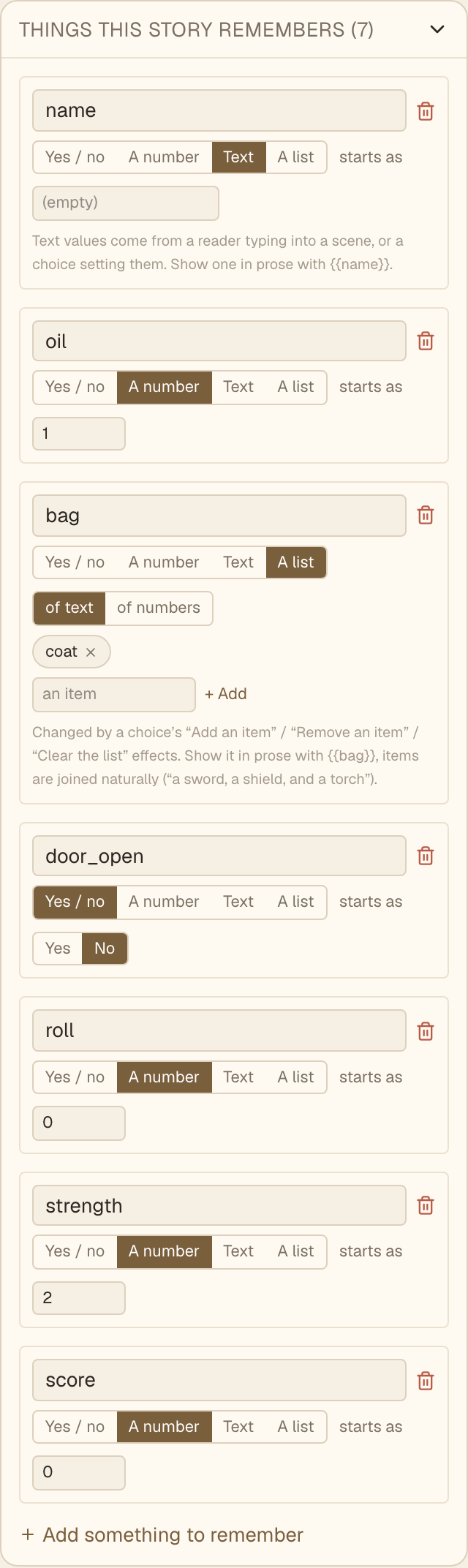
Names use letters, numbers and underscores, with no spaces. has_key and coins work. has key does not. Pick a name that says what it means, because you will choose it from menus for the rest of the story.
Each value also has a starting value, shown as "starts as". For a yes/no value it is Yes or No. For a number it is any number. Every reader starts with these values, and choices change them from there.
You can also create a value on the spot. Wherever the editor asks which value you mean, the last option in the menu is + Add a new value….
Change a value with a choice#
Each choice has a + Remember something button. It appears once your story has at least one value. Click it, pick the value, and pick what to do to it. What you can do depends on the type.
For a yes/no value:
- Set to yes
- Set to no
- Flip it, which turns yes into no and no into yes
- Set to yes some % of the time, which is covered in Randomness
For a number:
- Set to, which replaces it with a number you choose
- Add
- Subtract
- Roll a number from … to …, also covered in Randomness
A choice can change several values at once. Click + another to add more.
Change a value on arrival#
Sometimes the change belongs to the scene and not to any one choice. + Set a value on arrival appears under a scene's text, once your story has at least one value. It runs every time a reader lands on that scene, however they got there.
Every time means every time. If a reader reaches the scene twice, an Add happens twice.
Try it#
Here is a fountain with a coin count. Toss a coin in, fish one out, and watch the number in the panel below. The panel is only shown while you are testing. Your readers do not see it.
The fountain
- coins3
Keep going until the count goes below zero. You can toss coins you do not have, which is a bug in the story. The fix is on the next page.
How it works, briefly#
Wyoot does not store the numbers. It works out the current values by replaying the reader's choices from the start, using the effects you set. Two things follow from that.
First, you can add, rename or remove a value in a draft freely, because there is no saved state to break.
Second, the value a reader sees in the text is the value at the moment they arrived at that scene. A later change does not reach back and rewrite a scene they have already read.
Next#
A value that nothing reads is just a number. Hiding choices and forking shows how to make the story react to one.