Memory: variables
Lists and inventory
Track a growing collection of items.
On this page
A yes/no value remembers one fact. A number remembers one amount. A list remembers a growing collection: the items in a bag, the places a character has visited, the people they have met. It is how you build an inventory.
Make a list#
In the Things this story remembers card, add a value and set its type to A list. A second choice appears: of text for things like "rope" or "lantern", or of numbers for a collection of numbers.
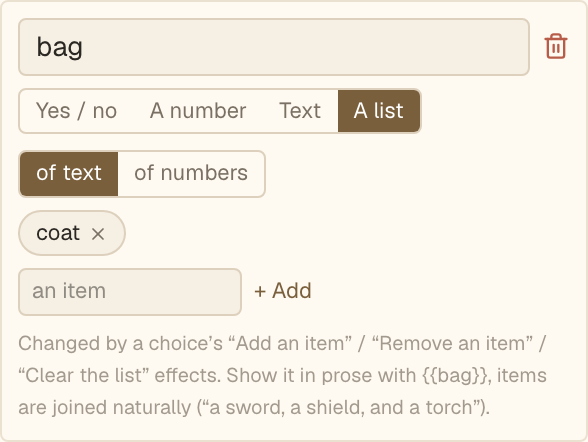
A list has a starting set of items too. Type an item and press Enter, or choose Add. Each one becomes a small chip, and the cross on a chip removes it. You never see raw brackets or commas.
A list is one kind all the way through. You cannot mix words and numbers in the same one.
Change a list#
On a choice, + Remember something now offers list actions:
- Add an item. Type the item, or for a number list, a number.
- Remove an item. Takes out the first item that matches. If it is not in the list, nothing happens.
- Clear the list. Empties it.
The item you add is fixed text (or a number). It is not built from other values.
Adding an item that is already there adds it again, so the list can hold two of the same thing. If that is not what you want, hide the choice once the item is in the bag, as the example below does.
Check a list#
In a check on a list, the two comparisons are contains and does not contain. Type the item to look for.
- Show "Climb down the rope" only if the bag contains "rope".
- Hide "Take the rope" once the bag contains "rope", so it can only be taken once.
- Combine checks. "Unlock the chest" can require that the bag contains "lantern" and also contains "key".
The shed
- bagcoat
Print a list#
A list prints in the text like any value: use Insert a value…. The items come out joined with commas and an "and" before the last, so "coat, rope, and lantern". An empty list prints nothing.
That is why the example's bag starts with a coat. A sentence like "You are carrying …" would otherwise read badly when the bag is empty. Either give the list a starting item, or put the sentence in a Shown-only-if paragraph. See Showing values in the text.
Pick one item from a list#
Sometimes you want one item, not the whole list. On a text or number value, + Remember something can offer two extra actions once a matching list exists:
- Pick a random item from a list. Chooses one at random, fairly. The same reader sees the same pick every time they resume.
- Get the item at a position in a list. Choose the list and a position. Position counts from zero, so 0 is the first item and 1 is the second. If the position is past the end, the last item is used.
If the list is empty, the value is left as it was.
This makes one particular game possible: choose a secret word from a pool, show it to the reader on one path, then check what they typed against it later. See Randomness.
What lists cannot do#
Two things are left out on purpose.
- A scene's choices are always ones you wrote. A list cannot generate choices, such as one button per item.
- You cannot compare a list's length. If you need "does the reader have at least three items", keep a number next to the list and add one to it each time you add an item, then check the number.
Common mistakes#
- Typing an item with different capitals or spelling in different places. "Rope" and "rope" are different items. Copy the same word each time.
- Forgetting to hide the take-choice, so a reader can take the same item repeatedly.
- Leaving a scene with no choice that always shows. If every choice depends on the bag, a reader with an empty bag is stuck. The preview warns you when this happens.
Next#
You can now collect things. Next, calculate with them. Read Math and comparing values.